Spanish PDF & Document Translator — English ↔ Spanish
Translate English to Spanish or Spanish to English while preserving your document’s layout. Upload your file, choose the target language, and review the credit quote.
How Spanish documents come out
Translate a document from English to Spanish or Spanish to English on the same page. Upload a PDF, Word document or scan, select the target language and review the credit quote. Download a translated file with its layout retained so you can compare it with the original.
Spanish uses the Latin alphabet with characters such as ñ, accented vowels and opening punctuation marks ¿ and ¡. A Spanish translation can take more space than the English source, especially in headings, table cells and fixed-size text boxes. A Word source keeps native paragraphs and table text editable; a formatted PDF follows the page visually but does not become an editable Word document.
English to Spanish, or Spanish to English
English → Spanish
Choose Spanish for an English report, letter or agreement. Check line wrapping, accents and the intended level of formality, especially whether the document consistently addresses its reader as usted or tú.
Spanish → English
Choose English for a Spanish report, letter or scan. Compare two-surname names, day/month dates, decimal commas and specialist terms with the original rather than assuming they follow US conventions.
Translate your document and keep its structure
The translator keeps your file’s structure and shows the credit quote before you start. The downloaded format depends on the source file.
- PDFs and scanned pages
- The translated PDF follows the page visually, with translated pages rendered as images. Selectable PDF text and identical fonts are not guaranteed.
- Word documents and PowerPoint presentations
- Start with DOCX or PPTX when you have it. Native paragraphs, table text and slide text can stay editable in the corresponding file format. Translated text inside pictures remains image content; review text wrapping and font changes in your editor.
- Excel workbooks and EPUB books
- Use the original XLSX or unprotected EPUB for a translated workbook or ebook. Review formulas, numbers and text cells in a workbook; check chapter order, navigation and text flow in your ebook reader.
What people translate to and from Spanish
Reports and agreements in either direction
Translate an English report for Spanish readers, or read a Spanish agreement in English. A DOCX source lets you keep working with editable paragraphs and tables after reviewing the translation.
School and community documents
Share an English school notice, schedule or handout in Spanish. Keep dates and instructions near their headings, then check that the wording fits the audience and the available page space.
Scanned forms and records
Upload a Spanish certificate or printed form without retyping it. Compare names, dates and handwritten entries with the source. An AI-generated translation does not include human certification for official use.
Presentations and workplace material
Translate English training slides into Spanish or Spanish project material into English. Use the native presentation file when available so translated text boxes remain editable, and review dense slides before sharing.
What to watch for in Spanish document translation
English and Spanish share many familiar-looking words without always sharing their meaning. In a formal document, vocabulary, forms of address and ambiguous pronouns can matter as much as layout. Check the meaning of specialist terms in context, keep names as written, and compare dates and decimal separators with the original. For scanned pages, also review stamps and handwritten additions that may be harder to recognize than the printed body text.
- Check narrow tables, page breaks and headings after English-to-Spanish translation; longer wording can wrap or reduce text size.
- Compare surnames, dates, decimal separators and units with the original in either direction.
- Review audience and terminology: Spanish varies by country, and words such as actual (current) and asistir (attend) can mislead a literal reading.
Spanish document translation FAQ
- Can I translate documents from English to Spanish and Spanish to English?
- Yes. Choose Spanish as the target for an English file, or English as the target for a Spanish file. Both directions use this page and retain the source file’s layout. Review the language selection and credit quote before starting.
- Is Spanish document translation free?
- Available free daily credits can cover a translation when your balance meets the quote. Upload the file to see its quote before starting; a file within the upload limits may still need more credits than your balance.
- What file will I download?
- Native DOCX, PPTX, XLSX and EPUB uploads use their corresponding file formats for the translated result. PDF output follows the page layout, with translated pages rendered as images; selectable PDF text is not guaranteed. Native Office text can remain editable, while translated text inside embedded pictures remains image content. Font choice, line breaks and page count can change.
- Can I translate a scanned Spanish document?
- Yes. You can upload a scanned PDF or a JPG, PNG or HEIC photograph without running a separate OCR tool. Use sharp, upright pages with complete margins. Small print, faded stamps, handwriting and text hidden by marks need careful checking against the source.
- Should I upload the PDF or the original Word document?
- Use the original DOCX when you need to revise the translated text. Keep formatting returns a DOCX with native paragraphs and table text still editable. A PDF is useful when the visible page arrangement is the reference, but its translated pages are image-based and do not provide guaranteed selectable text.
- Can I choose a regional Spanish variant?
- Use the target-language picker to select the supported Spanish option that fits your audience, including Spanish (Mexico) where appropriate. Review local terminology and formality before publishing the document.
- Is the result a certified translation?
- No. The result is an AI-generated translation without a human translator’s certification. It can help you read a document or prepare a draft. If you need to submit it officially, check the recipient’s requirements and arrange any required professional review or certification.
Download an example translation in Spanish
English community event notice → Spanish
Compare the notice’s headings, schedule and Spanish text. This is an image translation example: the downloads are PNG images, not editable Word documents or PDFs.

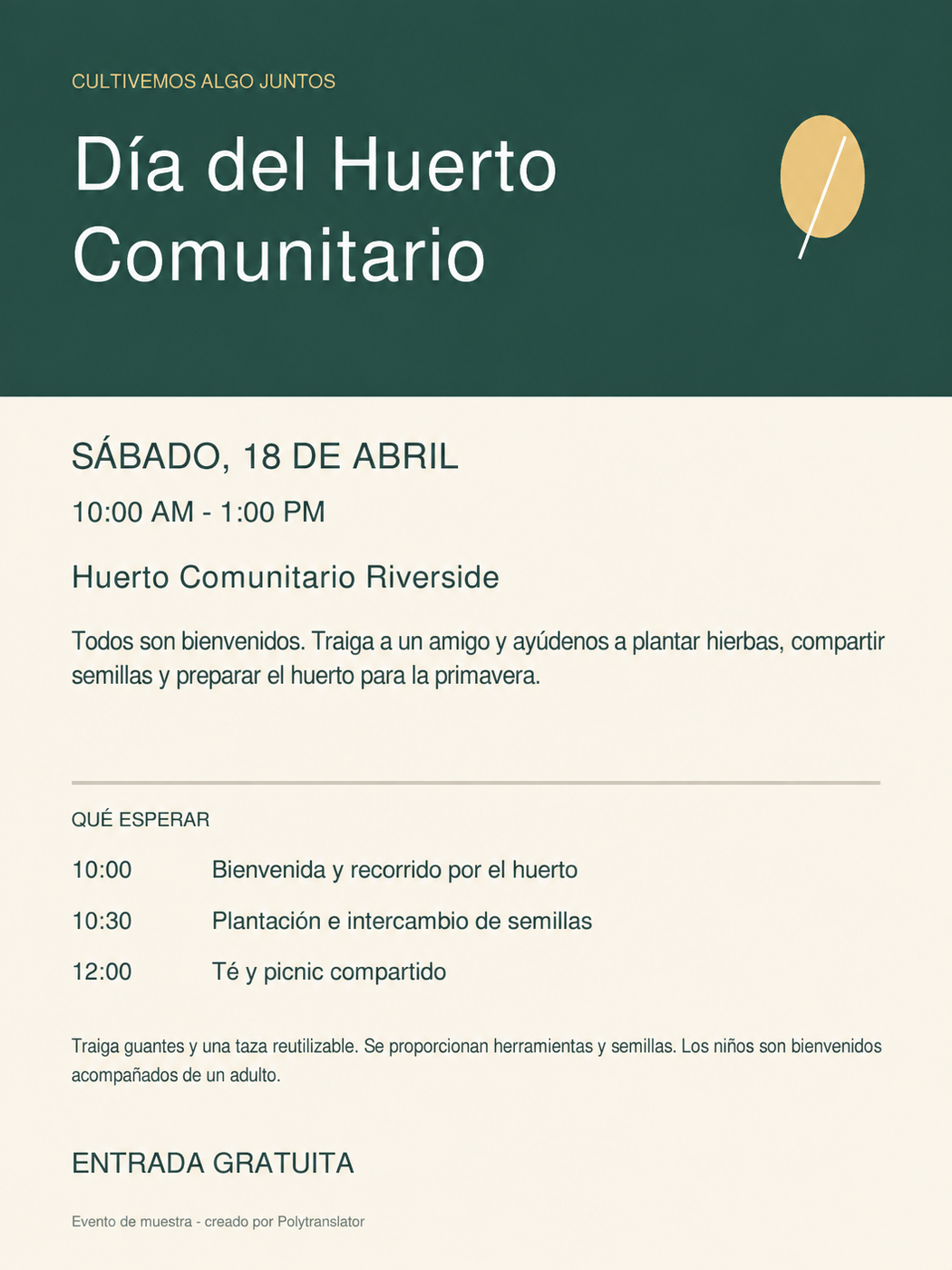
A synthetic example created for testing, translated September 15, 2026 with Fast and Keep formatting. The translation output is unedited. This example shows English → Spanish; it is not a test of the reverse direction or every file format. Sample details.
Translate documents in other languages
Tamil documentsTelugu documentsTagalog documentsUrdu documentsVietnamese documentsMandarin Chinese documentsArabic documentsBengali documentsGerman documentsFrench documentsSpanish text translatorAll document translation